Message Components
Message components — we'll call them "components" moving forward—are a framework for adding interactive elements to the messages your app or bot sends. They're accessible, customizable, and easy to use.
There are several different types of components; this documentation will outline the basics of this new framework and each example.
Button
Buttons are interactive components that render on messages. They can be clicked by users, and send an interaction to your app when clicked.
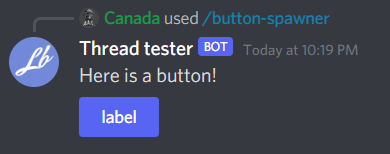
import { Injectable } from '@nestjs/common';
import { Context, Button, ButtonContext } from 'necord';

@Injectable()
export class AppComponents {
    @Button('BUTTON')
    public async onButton(@Context() [interaction]: ButtonContext): Promise<void> {
        await interaction.reply({ content: 'Button clicked!' });
    }
}
Dynamic Button
You can create buttons with dynamic id field. This is useful for passing metadata to buttons.
Dynamic buttons uses path-to-regexp format to perform regexp matching. Turn a path string such as user/:name into a regular expression.
To create a Dynamic button
import { ButtonBuilder, ButtonStyle } from 'discord.js';

new ButtonBuilder()
  .setCustomId('click/12345')
  .setLabel('LABEL')
  .setStyle(ButtonStyle.Primary)
To receive a Dynamic button
import { Injectable } from '@nestjs/common';
import { Button, ButtonContext, ComponentParam, Context } from 'necord';

@Injectable()
export class AppComponents {
  @Button('click/:value')
  public async onButton(
    @Context() [interaction]: ButtonContext,
    @ComponentParam('value') value: string
  ): Promise<void> {
    await interaction.reply({ content: `Button clicked! Value: ${value}` });
  }
}
Select Menu
Select menus are another interactive component that renders on messages. On desktop, clicking on a select menu opens a dropdown-style UI; on mobile, tapping a select menu opens up a half-sheet with the options.
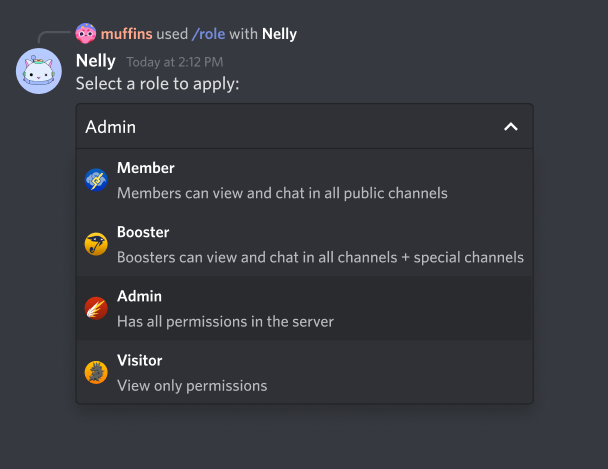
Discord has introduced new select menu components :
String SelectUser SelectRole SelectMentionable SelectChannel Select
String Select
String Select is Select Menu for picking defined text options
To create String Select:
import { StringSelectMenuBuilder } from 'discord.js';

new StringSelectMenuBuilder()
  .setCustomId('STRING_SELECT_MENU') // replace with your customId
  .setPlaceholder('Select your color')
  .setMaxValues(1)
  .setMinValues(1)
  .setOptions([
    { label: 'Red', value: 'Red' },
    { label: 'Blue', value: 'Blue' },
    { label: 'Yellow', value: 'Yellow' }
  ])
To receive a String Select:
import { Injectable } from '@nestjs/common';
import { Context, StringSelect, StringSelectContext, SelectedStrings } from 'necord';

@Injectable()
export class AppComponents {
    @StringSelect('STRING_SELECT_MENU')
    public async onStringSelect(
      @Context() [interaction]: StringSelectContext,
      @SelectedStrings() selected: string[]
    ): Promise<void> {
      await interaction.reply({
        content: `Your selected color - ${selected.join(' ')}`
      });
    }
}
User Select
User Select are Select Menu for selecting users
To create User Select:
import { UserSelectMenuBuilder } from 'discord.js';

new UserSelectMenuBuilder()
  .setCustomId('USER_SELECT_MENU')
  .setPlaceholder('Select a user')
  .setMaxValues(1)
  .setMinValues(1)
To receive a User Select:
import { Injectable } from '@nestjs/common';
import {
  Context,
  UserSelect,
  UserSelectContext,
  SelectedUsers,
  ISelectedUsers,
  SelectedMembers,
  ISelectedMembers
} from 'necord';

@Injectable()
export class AppComponents {
    @UserSelect('USER_SELECT_MENU')
    public async onUserSelect(
      @Context() [interaction]: UserSelectContext,
      @SelectedUsers() users: ISelectedUsers, // Collection of users
      @SelectedMembers() members: ISelectedMembers // Collection of members
    ): Promise<void> {
      await interaction.reply({
        content: `
        Selected users - ${users.map(user => user.username).join(',')}\n
        Selected members - ${members.map(member => member.user?.username).join(',')}
        `
      });
    }
}
Role Select
Role Select are Select Menu for selecting roles
To create Role Select:
import { RoleSelectMenuBuilder } from 'discord.js';

new RoleSelectMenuBuilder()
  .setCustomId('ROLE_SELECT_MENU')
  .setPlaceholder('Select a role')
  .setMaxValues(1)
  .setMinValues(1)
To receive a Role Select:
import { Injectable } from '@nestjs/common';
import {
  Context,
  RoleSelect,
  RoleSelectContext,
  SelectedRoles,
  ISelectedRoles,
} from 'necord';

@Injectable()
export class AppComponents {
    @RoleSelect('ROLE_SELECT_MENU')
    public async onRoleSelect(
      @Context() [interaction]: RoleSelectContext,
      @SelectedRoles() roles: ISelectedRoles, // Collection of roles
    ): Promise<void> {
      await interaction.reply({
        content: `
        Selected roles - ${roles.map(role => role.id).join(',')}
        `
      });
    }
}
Channel Select
Channel Select are Select Menu for selecting channels
To create Channel Select:
import { ChannelSelectMenuBuilder } from 'discord.js';

new ChannelSelectMenuBuilder()
  .setCustomId('CHANNEL_SELECT_MENU')
  .setPlaceholder('Select a channel')
  .setMaxValues(1)
  .setMinValues(1)
To receive a Channel Select:
import { Injectable } from '@nestjs/common';
import {
  Context,
  ChannelSelect,
  ChannelSelectContext,
  SelectedChannels,
  ISelectedChannels
} from 'necord';

@Injectable()
export class AppComponents {
    @ChannelSelect('CHANNEL_SELECT_MENU')
    public async onChannelSelect(
      @Context() [interaction]: ChannelSelectContext,
      @SelectedChannels() channels: ISelectedChannels, // Collection of channels
    ): Promise<void> {
      await interaction.reply({
        content: `
        Selected channels - ${channels.map(channel => channel.id).join(',')}
        `
      });
    }
}
Mentionable Select
Mentionable Select are Select Menu for selecting mentionables (users and roles)
To create Mentionable Select:
import { MentionableSelectMenuBuilder } from 'discord.js';

new MentionableSelectMenuBuilder()
  .setCustomId('MENTIONABLE_SELECT_MENU')
  .setPlaceholder('Select a user/role')
  .setMaxValues(1)
  .setMinValues(1)
To receive a Mentionable Select:
import { Injectable } from '@nestjs/common';
import {
  Context,
  MentionableSelect,
  MentionableSelectContext,
  SelectedUsers,
  ISelectedUsers,
  SelectedMembers,
  ISelectedMembers,
  SelectedRoles,
  ISelectedRoles,
} from 'necord';

@Injectable()
export class AppComponents {
    @MentionableSelect('MENTIONABLE_SELECT_MENU')
    public async onMentionableSelect(
      @Context() [interaction]: MentionableSelectContext,
      @SelectedUsers() users: ISelectedUsers,
      @SelectedMembers() members: ISelectedMembers,
      @SelectedRoles() roles: ISelectedRoles
    ): Promise<void> {
      await interaction.reply({
        content: `
        Selected users - ${users.map(user => user.username).join(',')}\n
        Selected members - ${members.map(member => member.user?.username).join(',')}\n
        Selected roles - ${roles.map(role => role.name).join(',')}
        `
      });
    }
}
Dynamic Select Menu
All the Select Menu types, support Dynamic id using path-to-regexp format.
To create a Dynamic select menu
import { StringSelectMenuBuilder } from 'discord.js';

new StringSelectMenuBuilder()
  .setCustomId('preferences/color')
  .setPlaceholder('Select a color')
  .setMaxValues(1)
  .setMinValues(1)
  .setOptions([
    { label: 'Red', value: 'Red' },
    { label: 'Blue', value: 'Blue' },
    { label: 'Yellow', value: 'Yellow' }
  ])
To receive a Dynamic select menu
import { Injectable } from '@nestjs/common';
import {
  ComponentParam,
  Context,
  SelectedStrings,
  StringSelect,
  StringSelectContext
} from 'necord';

@Injectable()
export class AppComponents {
    @StringSelect('preferences/:item')
	public async onPreferenceSelect(
		@Context() [interaction]: StringSelectContext,
		@SelectedStrings() values: string[],
		@ComponentParam('item') item: string
	): Promise<void> {
		await interaction.reply({
			content: `
      ${item} = ${values.join(',')}\n
      `
		});
	}
}
Dynamic select menus are compatible with :
StringSelectUserSelectRoleSelectMentionableSelectChannelSelect
You can view a working example here.