Commandes slash
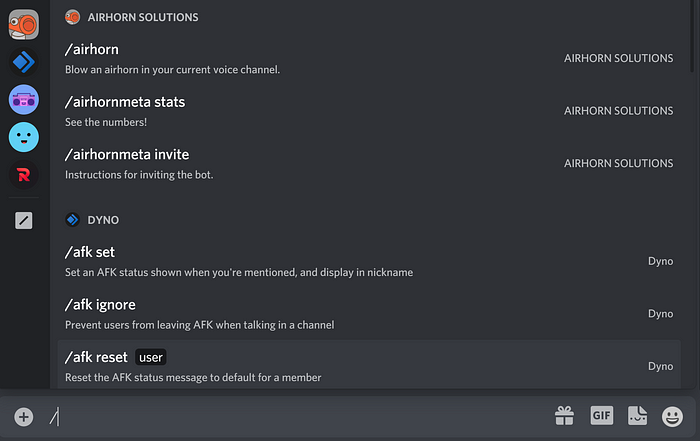
Les commandes slash constituent la nouvelle façon passionnante de créer des bots sur Discord et d'interagir avec eux. Avec les commandes slash, il vous suffit de
taper / et vous êtes prêt à utiliser votre bot favori. Vous pouvez facilement voir toutes les commandes dont dispose un bot, et la validation ainsi que la gestion des erreurs vous aident
à saisir la commande correctement du premier coup.
Commandes globales
Les commandes globales sont mises en cache pendant une heure. Les nouvelles commandes globales se propagent lentement sur tous les serveurs et leur mise à jour n'est garantie qu'au bout d'une heure. Les commandes de serveur se mettent à jour instantanément. C'est pourquoi nous vous recommandons d'utiliser des commandes basées sur le serveur pendant le développement et de les publier en tant que commandes globales lorsqu'elles sont prêtes pour une utilisation publique.
Créez le fichier app.commands.ts et ajoutez une méthode avec le décorateur SlashCommand.
import { Injectable } from '@nestjs/common';
import { Context, SlashCommand, SlashCommandContext } from 'necord';

@Injectable()
export class AppCommands {
    @SlashCommand({
        name: 'ping',
        description: 'Ping-Pong Command'
    })
    public async onPing(@Context() [interaction]: SlashCommandContext): Promise<void> {
        await interaction.reply({ content: 'Pong!' });
    }
}
Commandes de serveur
Si vous souhaitez avoir des commandes spécifiques à un serveur, utilisez la propriété guilds sur le décorateur SlashCommand
import { Injectable } from '@nestjs/common';
import { Context, SlashCommand, SlashCommandContext } from 'necord';

@Injectable()
export class AppCommands {
    @SlashCommand({
        name: 'ping',
        description: 'Ping-Pong Command',
        guilds: [process.env.DEV_GUILD!]
    })
    public async onPing(@Context() [interaction]: SlashCommandContext): Promise<void> {
        await interaction.reply({ content: 'Pong!' });
    }
}
Vous pouvez utiliser le décorateur à la fois sur la méthode et sur la classe.
Options
Utilisez le décorateur d'option pour définir un paramètre dans une commande slash, créons la classe LengthDto :
import { StringOption } from 'necord';

export class TextDto {
    @StringOption({
        name: 'text',
        description: 'Your text',
        required: true
    })
    public readonly text!: string;
}
Elle ne possède qu'une seule propriété de base. Nous pouvons ensuite utiliser le DTO nouvellement créé dans AppCommands :
import { Injectable } from '@nestjs/common';
import { Context, SlashCommand, Options, SlashCommandContext } from 'necord';
import { TextDto } from './length.dto';

@Injectable()
export class AppCommands {
    @SlashCommand({
        name: 'length',
        description: 'Get length of text'
    })
    public async onLength(
        @Context() [interaction]: SlashCommandContext,
        @Options() { text }: TextDto
    ): Promise<void> {
        await interaction.reply({ content: `Length of your text ${text.length}` });
    }
}
Liste de tous les décorateurs d'option intégrés :
| Décorateur | Type | Description |
|---|---|---|
StringOption | string | Une option de type chaîne de caractères |
NumberOption | number | Une option de type nombre |
IntegerOption | number | Une option de type entier |
BooleanOption | boolean | Une option de type booléen |
UserOption | User | Une option de type utilisateur |
MemberOption | GuildMember | Une option de type membre |
ChannelOption | GuildChannel | A channel option |
RoleOption | Role | A role option |
MentionableOption | GuildMember | Role | User | A mentionable option |
AttachmentOption | Attachment | An attachment option |
Autocomplete
To add autocomplete to your Slashcommand you will need a interceptor first. This class will intercept all requests from the user after typing in the autocomplete option field
import { Injectable } from '@nestjs/common';
import { AutocompleteInteraction } from 'discord.js';
import { AutocompleteInterceptor } from 'necord';

@Injectable()
export class AnimeAutocompleteInterceptor extends AutocompleteInterceptor {
    public transformOptions(interaction: AutocompleteInteraction): Promise<void> {
        const focused = interaction.options.getFocused(true);
        const choices =
            focused.name === 'anime' ? ['Hunter x Hunter', 'Naruto', 'One Piece'] : [];

        return interaction.respond(
            choices
                .filter(choice => choice.startsWith(focused.value.toString()))
                .map(choice => ({ name: choice, value: choice }))
        );
    }
}
You'll then have to add autocomplete: true to your options class:
import { StringOption } from 'necord';

export class AnimeDto {
    @StringOption({
        name: 'anime',
        description: 'The anime to look up',
        autocomplete: true,
        required: true
    })
    public readonly anime!: string;
}
And last but not least, apply the interceptor to your slash command
import { Injectable, UseInterceptors } from '@nestjs/common';
import { Context, SlashCommand, Options, SlashCommandContext } from 'necord';
import { AnimeDto } from './anime.dto';
import { AnimeAutocompleteInterceptor } from './anime.interceptor';

@Injectable()
export class AnimeCommands {
    @UseInterceptors(AnimeAutocompleteInterceptor)
    @SlashCommand({
        name: 'anime',
        description: 'Lookup information about an anime'
    })
    public async onSearch(
        @Context() [interaction]: SlashCommandContext,
        @Options() { anime }: AnimeDto
    ): Promise<void> {
        await interaction.reply({ content: `I found the anime ${anime}` });
    }
}
Groups
For those developers looking to make more organized and complex groups of commands, look no further than subgroups and groups.
Use SlashGroup decorators on class-level (Group) and method-level (SubGroup):
import { Injectable } from '@nestjs/common';
import {
    Context,
    createCommandGroupDecorator,
    SlashCommandContext,
    Subcommand
} from 'necord';

export const UtilsCommandDecorator = createCommandGroupDecorator({
    name: 'utils',
    description: 'Utils group',
});

@UtilsCommandDecorator()
@Injectable()
export class UtilsCommands {
    @Subcommand({
        name: 'ping',
        description: 'Ping-pong command'
    })
    public async onPing(@Context() [interaction]: SlashCommandContext): Promise<void> {
        await interaction.reply({ content: 'Pong!' });
    }
}

@UtilsCommandDecorator({
    name: 'string',
    description: 'String utility commands'
})
@Injectable()
export class UtilsStringCommands {
    @Subcommand({
        name: 'length',
        description: 'String length command'
    })
    public async onLength(@Context() [interaction]: SlashCommandContext): Promise<void> {
        await interaction.reply({ content: 'Use this subcommand to measure text.' });
    }
}
After the registration commands, the bot will process /utils ping and /utils string length commands, like here:

You can view a working example here.